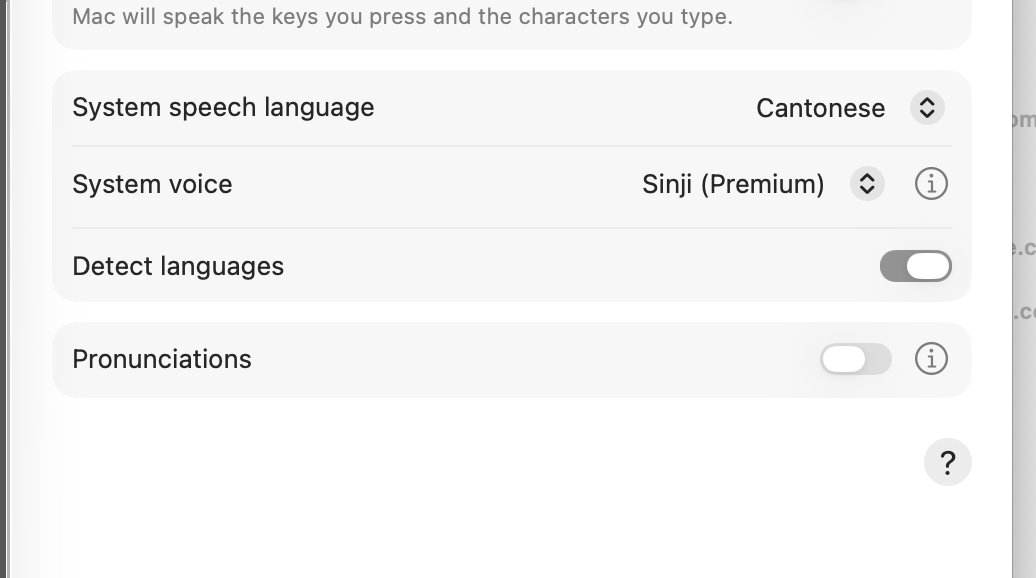
For over 20 years, I’ve relied on my Mac to read Chinese out loud to me. As someone with dyslexia, this wasn’t just a feature — it was how I’ve been able to work, learn, and stay independent.
But that voice is now gone. Cantonese text-to-speech on Mac has not worked correctly for over a year. Even after updates, the “Speak” function doesn’t read Cantonese anymore — or worse, it reads it in Mandarin.
Yes, the system still displays Cantonese and even allows me to select the voice “Sinji (Premium)”, but it doesn’t always speak Cantonese. Why? Because Apple’s “Detect Languages” system is unreliable — especially for Chinese, where Mandarin and Cantonese often use the same characters.
Turning detection off still doesn’t guarantee it will speak Cantonese. And for someone like me, who depends on this tool to read every day, that’s a serious problem.
What Are the Alternatives?
If you’re in the same situation, here’s what’s still working outside of Apple’s system:
- Google Cloud TTS → Offers
yue-HK(Cantonese Hong Kong) voices - Microsoft Azure Speech → Offers
zh-HKneural voices - Amazon Polly → Includes Cantonese voice “Hiujin” (
yue-CN)
These are APIs — meaning they need a small app or tool to work. But with just a few lines of code, you can create your own “read aloud in Cantonese” tool that works in your browser.
What’s Next?
I’ve been an Apple user for decades. But now I’m asking:
Should I move to a PC? Or build my own tool — one that doesn’t rely on Apple’s confusing language detection to speak my language right?
If you’ve faced the same problem, or want to try building a simple tool together, let’s connect. Cantonese reading aloud isn’t optional for people with dyslexia — it’s essential.
And if Apple won’t fix it, maybe we will.
 noeltmng blog